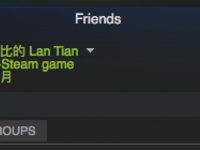
Recently, Greedy Moon (贪玩蓝月) has gained popularity due to its brainwashing advertisements. Many tutorials have emerged showing how to add a custom program to Steam and rename it to "Greedy Moon" to display yourself as playing the game. However, this method requires keeping that custom program running constantly, which can be inconvenient. ASF (ArchiSteamFarm) is a program that simulates game play to farm Steam trading cards. Since it can simulate game play, it can naturally also simulate playing "Greedy Moon" - achieving the effect shown below without any local configuration: To implement this effect, modify the ASF configuration on your host machine running ASF. Open config/[BotName].json and modify these three parameters: "CustomGamePlayedWhileFarming" : "贪玩蓝月" ,...
How to Achieve a Perfect Score on SSL Labs Test
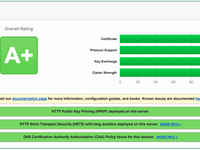
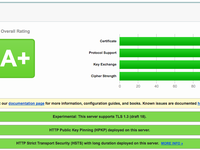
Qualys SSL Labs is a website for testing server SSL functionality, often used as a reference when configuring servers. Typically, we only consider its rating (A+, A, B, C, D, E, F, T), where achieving A+ is considered excellent server configuration. However, SSL Labs also displays sub-scores next to the rating, and my main site hasn't maxed out all of them. What would it take to achieve perfect scores across all SSL Labs subcategories, and what practical significance does it hold? I installed nginx on a VPS not hosting any website and configured it to successfully achieve a perfect score, as shown in the image or here : For comparison, here's this site's rating (also viewable here ):...
Raspberry Pi 3B Tinkering Notes: Hardware Random Number Generator
Random numbers play a crucial role in computing. For example, commonly used SSL encryption algorithms heavily rely on random numbers. If the random numbers aren't sufficiently random, attackers might potentially guess them, causing the entire encryption verification system to collapse. However, due to the deterministic nature of computers (where zero is strictly zero and one is strictly one), they cannot generate truly random numbers and can only simulate randomness through complex algorithms. On Linux systems, leveraging its "everything is a file" philosophy, random numbers generated by the Linux kernel from aggregated system data can be read from /dev/random . But because Linux prioritizes security and collects extensive data, the random number generation speed is very slow....
Raspberry Pi 3B Tinkering Notes: BT Download and Policy Routing
Let's get straight to the point this time. (Actually, I'm not sure how to start.) Installing Transmission for PT As a compact computer that can freely connect to various sensors, the Raspberry Pi offers high playability. Even if you don't want to connect a bunch of sensors to the GPIO (or like me, think additional sensors are temporarily unnecessary), you can leverage its low-power characteristics to run it 24/7 for tasks that don't require heavy CPU computation but take a long time to complete due to other factors—like... background downloading. My university has an intranet PT (Private Tracker) site. A PT site is a platform for releasing BT seeds, but it adds user management features on top of traditional BT. By restricting client types and enforcing upload ratio requirements,...
Raspberry Pi 3B Tinkering Notes
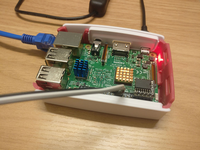
During the National Day holiday, I purchased a Raspberry Pi 3B and a bunch of sensors from Taobao to start some projects. Due to holiday shipping delays, all components arrived piecemeal days after the vacation ended. First, a photo of the completed setup: I ordered from five different stores: Raspberry Pi 3B (with case, fan, heatsinks, power supply) SanDisk 32GB TF card Raspberry Pi sensor kit (3.3V compatible, 16 sensors total) 5-inch 800x480 touchscreen DS3231 RTC module and GPIO pin labels (purchased later) Raspberry Pi Unit The Pi 3B arrived first. However, the TF card hadn't arrived yet, leaving the Pi unusable. I proceeded to assemble the case and cooling system. Encountered an issue: The case's internal support pillars were misaligned....
CommentToMail Modified Version
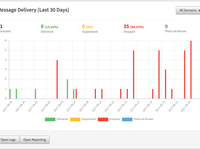
Recently, I suddenly noticed that the daily emails from my self-built Baidu Tieba check-in system had stopped, though the check-ins were still happening normally. When I checked the Mailgun interface, the status was all red: The logs showed a long list of bounce messages sent to my Outlook mailbox, such as: The error indicated that Mailgun's entire AS (Autonomous System) had been blacklisted by Outlook. It was now completely unusable. The good news is that many email service providers offer similar services to Mailgun, such as SendGrid. I quickly registered an account on their website, enabled SMTP, and connected my Tieba check-in system, NextCloud, and other services without any issues. The bad news is that my blog uses CommentGun , which I specifically developed for Mailgun,...
Enabling TLS 1.3 for nginx and Passing to FastCGI Backends
OpenSSL provides experimental support for TLS 1.3 in its latest beta version, including a series of performance and security optimizations. The latest nginx 1.13 series has also added relevant options for TLS 1.3. However, since TLS 1.3 is still in draft status, there are some challenges to overcome when using it now: TLS 1.3 currently has three draft versions (18, 19, 20) implemented by OpenSSL and others, but they are mutually incompatible, and no SSL library combines all three. Browsers like Chrome and Firefox widely use draft version 18, but this version of OpenSSL doesn't support TLS extensions, which are required for Certificate Transparency. Although the latest nginx-ct plugin adds Certificate Transparency support for TLS 1.3, due to issue #2,...
Joining the DN42 Experimental Network
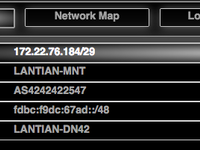
2020-03-16 Notice This article has an updated version: see 《 Introduction to the DN42 Experimental Network (2020 Edition) 》. The new version features a more detailed registration process and has been updated to reflect changes in DN42 over the past three years. The following content was written in 2017 and is for archival purposes only. DN42, short for Decentralized Network 42, is a large-scale VPN network. Unlike traditional VPNs, DN42 utilizes technologies commonly deployed on internet backbones (such as BGP), effectively simulating a real-world network environment. Due to its realistic nature, the barrier to entry for DN42 is relatively high. You'll need to act as an ISP (Internet Service Provider): register an ASN number, obtain IPv4 and IPv6 address pools,...
Building Your Own IPv6 Tunnel with ZeroTier One
Preface Most ISPs in China do not provide IPv6 addresses to users, except for the Education Network. However, the IPv6 service on the Education Network is highly unstable (possibly specific to my institution), and once you leave campus, IPv6 becomes unavailable, which is quite frustrating. One alternative is using HE.NET's tunnel service . After SixXS shut down, they are currently the largest remaining IPv6 tunnel provider, and their service is completely free. However, their service isn't suitable for home network environments in China, as home networks typically have dynamic IPs, and some ISPs have started using large-scale NAT to save costs, preventing users from obtaining independent IPs and causing conflicts within the same internal network....
Establishing Dual-Stack Intercommunication Network Between Multiple Docker Servers Using ZeroTier One
Preface Achieving intercommunication between containers on multiple Docker servers is a challenging problem. If you build your own overlay network, you need to set up services like etcd on one server. But if the server hosting etcd crashes, the entire network goes down. The cheap VPS I use occasionally experiences network interruptions, and I often accidentally crash servers myself, so this approach isn't feasible for me. Docker also has other commercial overlay networking solutions like Weave, but for individual users, these solutions are too expensive (I'm just experimenting for fun), so they're not considered either. In these network architectures, central servers like etcd or Weave record which server each container is on and its internal IP, allowing DNS resolution to any container....